
NabixSoft Invoice · Practical guide
A reliable recurring invoice routine for repeat services.
A repeat service should be easy to bill consistently. Whether you provide regular maintenance or an ongoing client service, recurring invoices can reduce repeated preparation. The useful part is the routine around them: correct timing, current customer information, a review of changes, and a clear record of payment.
Decide which work belongs in a recurring routine
Start with work that follows a recognizable billing pattern. A regular maintenance visit, an agreed monthly service, or a yearly renewal may fit. List what the regular amount covers and which extra work needs a separate review. A repeated client relationship does not always mean the same charge belongs on every invoice.
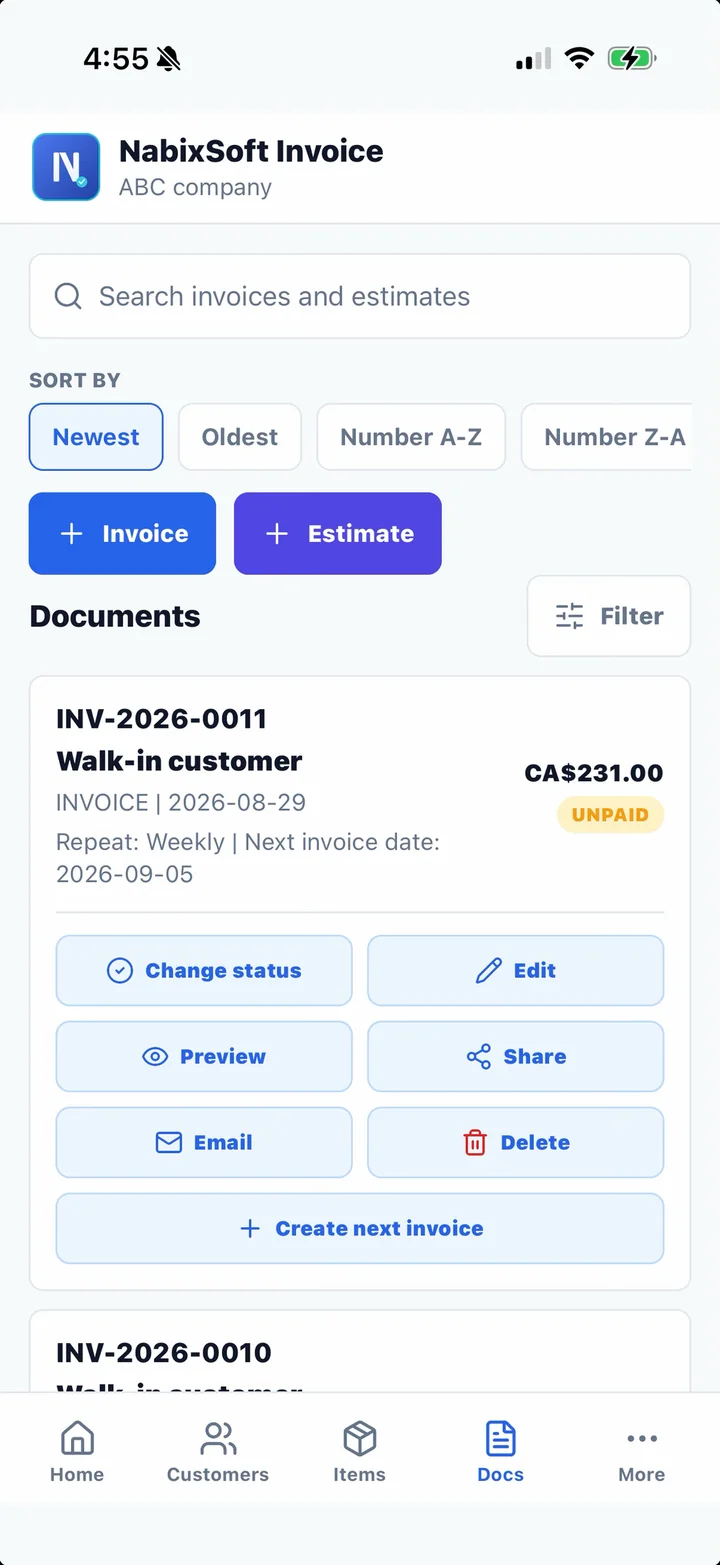
NabixSoft Invoice supports weekly, monthly, and yearly recurring invoices. Choose the available frequency that matches your actual arrangement. If the work varies substantially each time, keep a deliberate review step so that convenient repetition does not carry an outdated quantity or description into a new document.
Prepare the customer and service information
Use the saved customer record for the client you intend to bill. Review the billing name, contact information, and any service description that will appear repeatedly. A person who arranges the work may have a different billing contact, so settle that detail before relying on the routine.
Make the regular service recognizable. A description such as a named maintenance service and the period it covers is easier to understand later than an unexplained recurring charge. Use your catalog as a starting point and check the quantity, rate, and tax settings you enter. See the products and services catalog guide for keeping reusable items clear.
Review timing and frequency together
Write down the billing pattern you are trying to maintain, then compare it with the recurring settings in the app. Weekly, monthly, and yearly arrangements describe different schedules. The app stores a next invoice date and provides a Create next invoice action. You create and review the next document; this is not an unattended email scheduler or an automatic payment charge.
For example, a monthly service might describe the particular month of work in its line items or notes. When reviewing the document, make sure the period is current rather than carrying the name of an earlier month. Keep your own agreement with the client as the reference for when and what to bill; the app organizes the document workflow.
Give each billing cycle a short review
A recurring workflow still benefits from a pause before delivery. Check whether the service continued as planned, whether the customer requested extra work, and whether a saved rate or contact has changed. Separate a one-time addition from the regular service so the client can see why this invoice differs from the previous one.
- Confirm that the service is still active.
- Check the period and customer details.
- Review the regular amount and any additional line items.
- Preview the PDF and payment instructions.
- Record delivery and payment activity through the tools you use.
This brief checklist makes repeat billing easier to explain when a client asks about a difference between two months.
Treat delivery and payment as separate follow-ups
Use the app’s available PDF sharing, email, or printing workflows to provide the document to the customer. Network-dependent delivery still depends on the service you use. Opening a share sheet does not independently confirm that an email reached its destination, so check the sending tool when delivery matters.
Recurring invoices also do not establish that a customer has paid. NabixSoft Invoice includes payment details you provide, while payment processing happens through your chosen method. Review funds received before updating your records. For an overview of several outstanding documents, use the customer statements and unpaid invoice workflow.
Review the routine when the service changes
When a client pauses, changes, or finishes a service, review the recurring setup as part of closing that work. Keep the documents already issued available for reference. A useful history explains what happened during the relationship, including the last period billed and any amount still outstanding.
Make a complete backup after significant changes and before replacing or erasing a device. Recurring billing information belongs with the working business records you may need to restore. Keeping a PDF archive can help with reading older documents, while the app’s backup provides the file used for recovery. Check the current app workflow if you are uncertain how a particular schedule behaves on your device.
Common questions
Which recurring frequencies are described for the app?
NabixSoft Invoice supports weekly, monthly, and yearly recurring invoices. Review the current app controls for the available schedule options.
Will recurring invoices automatically collect payment?
Payment processing happens through your chosen payment method. Check received payments and keep invoice status accurate.
Should I review a repeated invoice?
Yes. Confirm the service period, customer details, amount, and changes before delivering each document.

A practical next step · Available now
NabixSoft Invoice
Use NabixSoft Invoice for the recurring document routine described here, with weekly, monthly, and yearly recurring invoices, customer records, and professional PDF sharing.
Available on Android, iPhone, and iPad. Check your regional store for current compatibility and pricing.