
Find products faster
Scan barcodes and QR codes, or search by product name, SKU, category, supplier, or location.
Inventory management · Available now
NabixSoft Inventory Pro is an offline inventory management app for small businesses. Organize products, scan barcodes, and track stock across locations without a required account.
iPhone & iPad
Designed around your day
For shops, stockrooms, supplies, tools, and personal collections: keep quantities and product details together, even when there is no internet connection.
Scan barcodes and QR codes, or search by product name, SKU, category, supplier, or location.
Receive, remove, and transfer stock across locations. Review stock movements and recent activity.
See low-stock and out-of-stock products and set daily stock reminders.
Track cost value, retail value, and potential profit. Create and share inventory valuation reports as PDFs.
Save product photos and storage details. Generate printable barcode and QR-code labels.
Export a complete inventory backup and restore it when needed. Everyday inventory management works offline.
Inside Inventory Pro
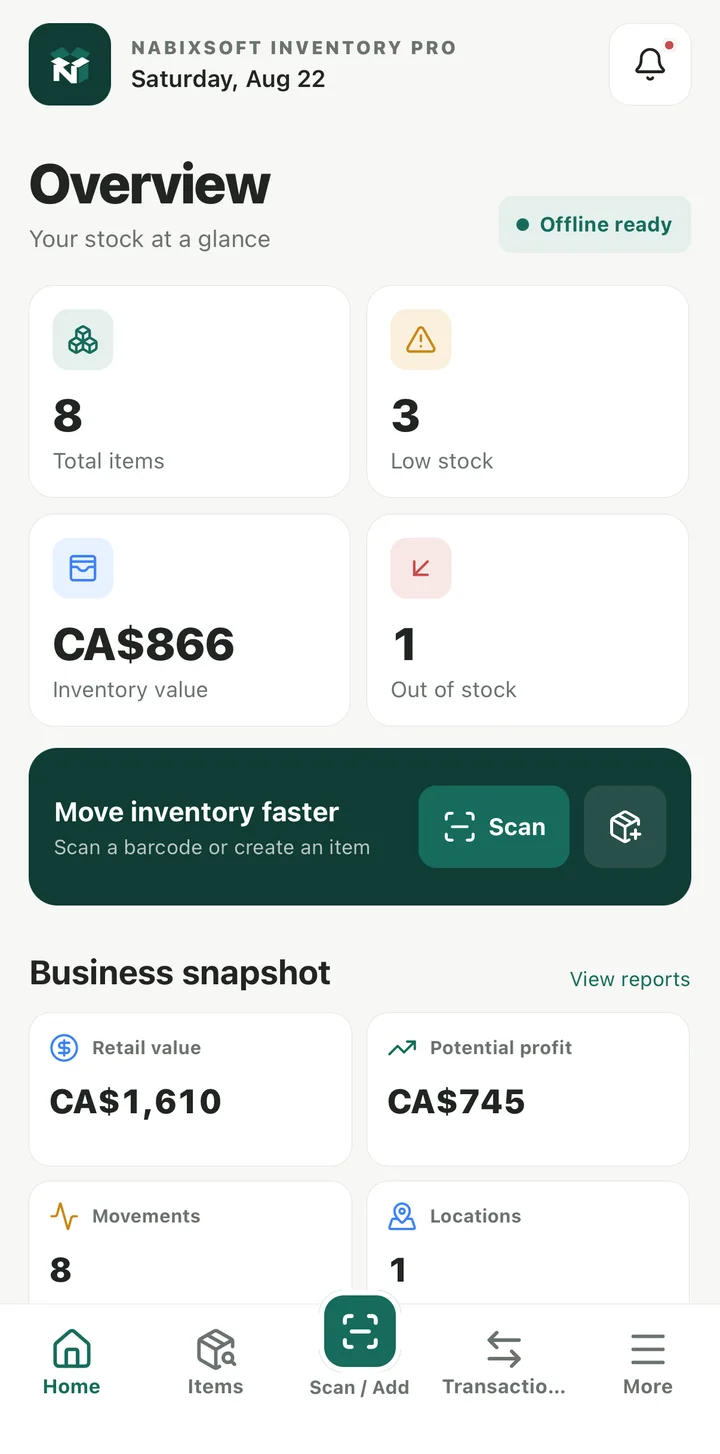
See product counts, low-stock items, inventory value, and a business snapshot from the overview screen.
See Inventory Pro on the App Store ↗Before you get started
Yes. Everyday inventory workflows work offline and data is stored locally on your device. No account is required for core inventory management.
The published App Store listing supports iPhone and iPad. We have not added an Android download because a published Google Play listing has not been confirmed.
Yes. Organize locations and record stock received, removed, or transferred between them.
The App Store listing describes a one-time purchase with no subscription. Check the listing for current pricing in your region.
You can share PDF inventory valuation reports and export a complete backup for later restoration. Keep backups outside the app before replacing or erasing a device.
For the current mobile privacy policy, open the Privacy Policy link on the official Inventory Pro App Store listing. The NabixSoft privacy page explains the brand site’s policy scope.
Contact NabixSoft support · Compare all NabixSoft apps
NabixSoft Invoice · Solo Contractors · ShiftPay · NabixSoft Leads
Practical ways to use the app
Learn a practical barcode inventory workflow with Inventory Pro: organize SKUs, scan products, record stock movements, and create printable barcode or QR labels.
Read the guideBuild a practical stock-management routine for your shop or stockroom: clear product records, location tracking, stock movements, low-stock checks, and backups.
Read the guideUnderstand inventory valuation reports and complete backups in Inventory Pro. Learn what each file is for, when to export it, and how to prepare for a new device.
Read the guideEstimate when to reorder using daily demand, lead time, and a buffer. See a worked example and use low-stock alerts to review what is on hand.
Read the guideOrganize inventory locations and record transfers in Inventory Pro. Learn how clear storage names, consistent units, movement checks, and backups support stock records.
Read the guideBuild a searchable inventory catalog with clear names, SKUs, barcodes, categories, supplier details, and storage notes in NabixSoft Inventory Pro.
Read the guideUnderstand cost value, retail value, and potential profit in Inventory Pro. Review quantities and price units before using an inventory valuation report.
Read the guideBuild practical tool and supply records in Inventory Pro. Use photos, storage notes, categories, stock movements, and physical checks to find what you have.
Read the guidePrepare an offline inventory workflow on iPhone or iPad with Inventory Pro. Organize products, record movements, share reports, and plan local backups.
Read the guideOrganize supplier information and record incoming stock with Inventory Pro. Check product identity, packaging units, quantities, locations, and recent movements.
Read the guidePlan a manageable stock count with Inventory Pro. Identify products, use consistent units, check locations, review movements, and keep a recoverable record.
Read the guideOrganize a retail shop inventory routine with Inventory Pro. Keep product details, storage locations, receiving, movements, stock checks, and backups consistent.
Read the guideOrganize stockroom records in Inventory Pro with recognizable products, storage details, locations, transfers, stock checks, and local inventory backups.
Read the guideUse product photos, descriptions, and storage notes in Inventory Pro to distinguish similar items, locate stock, and keep useful inventory context current.
Read the guideFind inventory records by name, SKU, barcode, category, location, or supplier in Inventory Pro, then confirm the product and unit before recording a movement.
Read the guideReview receiving, removal, and transfer history in Inventory Pro. Confirm products, units, locations, and physical context when a stock quantity needs investigation.
Read the guidePrepare useful barcode and QR labels with Inventory Pro. Confirm product codes, preview labels, test a sample, and keep printed identification connected to records.
Read the guideSet up a manageable first inventory in Inventory Pro with clear product records, units, categories, locations, opening checks, and a complete local backup.
Read the guideOrganize a personal collection with Inventory Pro using clear item names, photos, categories, storage details, search, and complete inventory backups.
Read the guidePrepare an understandable inventory handover with Inventory Pro. Clarify product units, locations, recent movements, local device boundaries, and recovery files.
Read the guideCompare Excel and inventory apps for small-business stock tracking. Consider product records, movement entry, barcode lookup, reports, backups, and working habits.
Read the guideMove from Excel stock records with a careful inventory transition: preserve the workbook, clean product identifiers, count opening stock, and check movements.
Read the guideReduce common inventory mistakes with clearer product identities, consistent stock units, timely movement entry, location checks, and complete recovery backups.
Read the guideImprove inventory accuracy with focused physical checks, movement-history reviews, consistent product units, and follow-up on recurring stock discrepancies.
Read the guideOrganize home business inventory with clear product records, dedicated storage, receiving and removal habits, and offline stock tracking on iPhone and iPad.
Read the guideLearn what inventory management means: identify products, track stock coming in and going out, maintain storage locations, count physical stock, and review records.
Read the guideKeep damaged-stock reviews clear: identify affected products, separate them physically, check prior movements, record genuine removals, and review stock availability.
Read the guidePrepare seasonal stock with checked opening quantities, clear storage locations, recorded movements, and a practical end-of-season inventory review.
Read the guideChoose an inventory app with a practical checklist for products, barcode lookup, receiving, removals, locations, reports, offline work, and backup recovery.
Read the guideAvoid stock unit confusion when goods arrive in packs or boxes. Define a consistent unit, check receiving quantities, and keep packaging information understandable.
Read the guide