
Track your actual workday
Clock in and out, record paid or unpaid breaks, or add shifts manually, including overnight work.
Work hours & pay tracking · Available now
ShiftPay is an offline-first work hours and estimated pay tracker for hourly workers. Record live or manual shifts, track breaks and overtime, and review your work across multiple jobs. Download ShiftPay for iPhone and iPad from the App Store.
iPhone & iPad
Designed around your day
Keep a personal record of your hours, pay settings, mileage, and expenses. Estimates use the rates and rules you enter, so you can compare them with your actual gross paycheck.
Clock in and out, record paid or unpaid breaks, or add shifts manually, including overnight work.
Manage multiple jobs, per-job currencies, rate history, and the rates used for earlier shifts.
See regular hours, overtime, double-time, and premiums using your own settings. Review weekly, biweekly, semi-monthly, or monthly pay periods.
Log job-based mileage and expenses and review reimbursement totals alongside your work records.
Create PDF and CSV exports, export to your device calendar, and make a local backup for restoration.
Organize rotating schedules and shift templates, with local reminders for upcoming shifts and breaks.
Inside ShiftPay
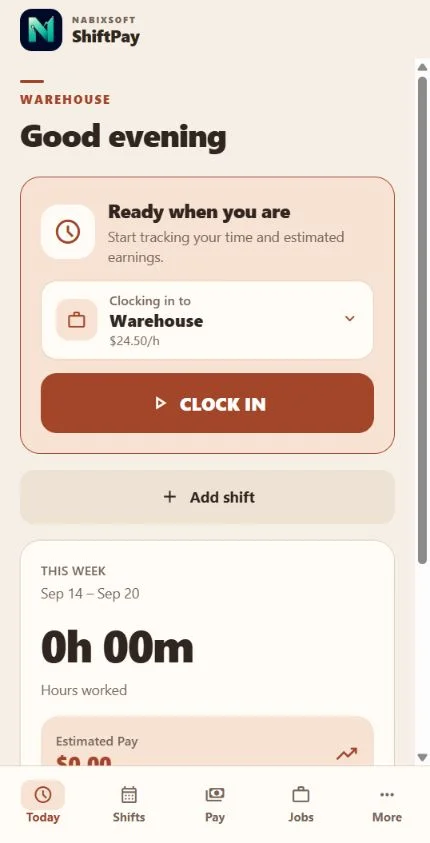
A preview of the ShiftPay Today screen with clock-in controls and estimated pay. Example shift data is shown.
Explore the ShiftPay website ↗Before you get started
ShiftPay is available for iPhone and iPad on the App Store. Check the listing for current regional availability and compatibility. Explore the ShiftPay product website for the app tour.
ShiftPay provides estimated gross pay from your hours, rates, and settings. It does not replace employer payroll or calculate take-home pay after taxes and deductions. Compare estimates with your actual paycheck.
Yes. The app supports multiple jobs, their pay settings, rate history, and work records.
Yes. Track paid or unpaid breaks during a live shift or enter shifts manually, including shifts that cross midnight.
Core shift and estimated-pay tracking is designed to work offline. Export and keep a backup before changing devices or deleting app data.
Visit the ShiftPay website for the full tour, Privacy Policy, and Terms of Use.
Contact NabixSoft support · Compare all NabixSoft apps
NabixSoft Invoice · NabixSoft Inventory Pro · Solo Contractors · NabixSoft Leads
Practical ways to use the app
Record live and manual shifts, review dates and breaks, and keep a useful personal work-hours record with ShiftPay for iPhone and iPad.
Read the guideCheck start and end dates, paid and unpaid breaks, and shift notes when tracking overnight work in ShiftPay.
Read the guideOrganize per-job rates, currencies, pay periods, and rate history in ShiftPay without mixing unrelated work records.
Read the guideReview hours, rates, breaks, and configured overtime settings behind a ShiftPay gross-pay estimate, then compare it with employer records.
Read the guideCheck reporting dates, jobs, currencies, shifts, and actual-paycheck context with this practical ShiftPay pay-period review.
Read the guideChoose PDF timesheets, CSV exports, or a versioned JSON backup in ShiftPay, and review files before sharing or restoring.
Read the guide