
ShiftPay · Practical guide
Build a reliable work-hours tracking routine
A useful hours record is one you can explain later. ShiftPay lets you record live or manual shifts and review estimated pay on your device. A short routine before and after work helps keep those records connected to what actually happened.
Choose the right job before recording time
Start by checking the job and the rate settings you intend to use. For people with several roles, a familiar employer name is not enough if two jobs use different rates or currencies. Keep job names recognizable so you can choose the right one at the start of a busy day.
ShiftPay supports multiple jobs with their own pay settings. Review defaults such as breaks and pay periods before relying on a new record. The multiple-jobs guide explains how to keep those inputs organized.
Use a live timer and record breaks deliberately
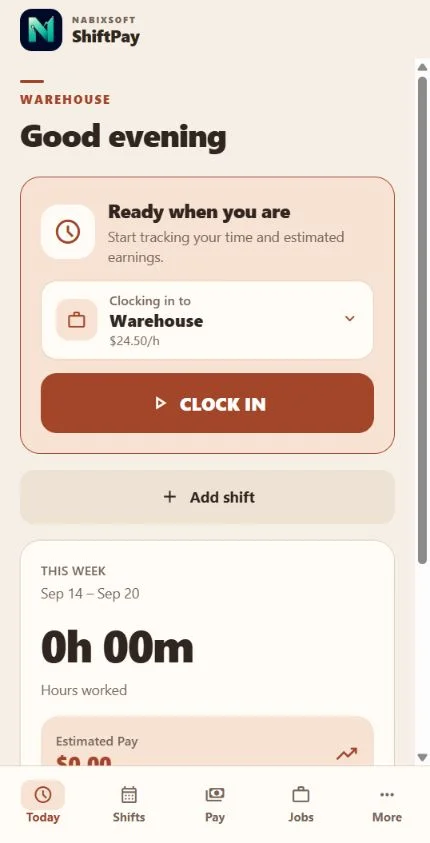
Clock in when the recorded work begins and check that the app shows the intended job. Record paid or unpaid breaks according to the information you want in your personal record. An estimate depends on those entries and settings, so a forgotten break can affect the result.
If you are interrupted, review the active shift when you return. The published listing describes active-shift recovery if the app closes or restarts. Still check the recovered job, time, and break state before treating the record as complete.
Enter missed shifts while the details are clear
Use manual entry for a shift you did not time live. Check both dates as well as the start and finish times, especially around midnight. Use a note to explain a correction or unusual schedule rather than leaving yourself to guess next month.
Compare with your own schedule or contemporaneous notes when needed. Avoid creating a second entry for a shift already saved. For work that crosses midnight, use the overnight shift review before saving.
End the day with a quick check
Review the shift summary, total time, breaks, job, and notes. Correct obvious mistakes before they become part of a larger report. A short daily check is easier than reconstructing an entire pay period from memory.
ShiftPay is available for iPhone and iPad. Its core tracking works offline, while external sharing and storage services may need a connection. Keep a recovery copy using the export and backup routine.
Common questions
Can I add a shift without using a live timer?
Yes. ShiftPay supports manual shifts as well as live tracking.
Does the timer determine my official payable hours?
It creates your personal record from your entries. Compare it with employer records and your actual work.
Can core tracking work offline?
Yes. The published listing describes offline core tracking without a required account.

A practical next step · Available now
ShiftPay
Track work hours, breaks, overtime, and estimated gross pay. Keep shifts, multiple jobs, mileage, and expenses organized in one offline-first app.
Available on the App Store for iPhone and iPad. A Google Play download link has not been confirmed.